# vue2源码-Core
core 目录包含了 Vue.js 的核心代码,包括内置组件、全局 API 封装,Vue 实例化、观察者、虚拟 DOM、工具函数等等。
# components 模板编译代码
# global-api 最上层的文件接口
# instance 生命周期
初始化 Vue 到最终渲染的整个过程
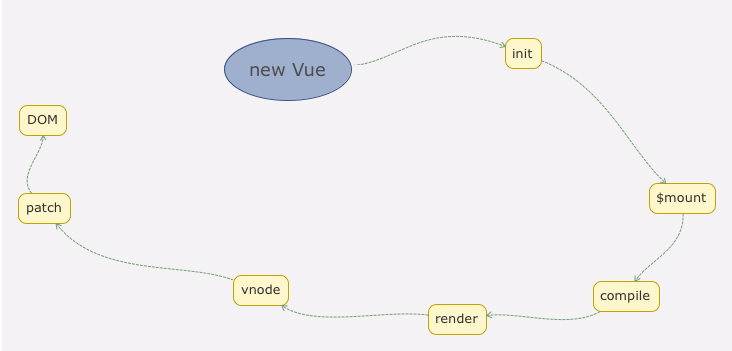
# 1.new Vue 发生了什么
//src/core/instance/index.js
function Vue (options) {
  if (process.env.NODE_ENV !== 'production' &&
    !(this instanceof Vue)
  ) {
    warn('Vue is a constructor and should be called with the `new` keyword')
  }
  this._init(options)
}
2
3
4
5
6
7
8
9
Vue只能通过new关键字初始化,然会调用this._init方法,该方法在 src/core/instance/init.js 中定义
Vue.prototype._init = function (options?: Object) {
  const vm: Component = this
  // a uid
  vm._uid = uid++

  let startTag, endTag
  /* istanbul ignore if */
  if (process.env.NODE_ENV !== 'production' && config.performance && mark) {
    startTag = `vue-perf-start:${vm._uid}`
    endTag = `vue-perf-end:${vm._uid}`
    mark(startTag)
  }

  // a flag to avoid this being observed
  vm._isVue = true
  // merge options
  if (options && options._isComponent) {
    // optimize internal component instantiation
    // since dynamic options merging is pretty slow, and none of the
    // internal component options needs special treatment.
    initInternalComponent(vm, options)
  } else {
    vm.$options = mergeOptions(
      resolveConstructorOptions(vm.constructor),
      options || {},
      vm
    )
  }
  /* istanbul ignore else */
  if (process.env.NODE_ENV !== 'production') {
    initProxy(vm)
  } else {
    vm._renderProxy = vm
  }
  // expose real self
  vm._self = vm
  initLifecycle(vm)
  initEvents(vm)
  initRender(vm)
  callHook(vm, 'beforeCreate')
  initInjections(vm) // resolve injections before data/props
  initState(vm)
  initProvide(vm) // resolve provide after data/props
  callHook(vm, 'created')

  /* istanbul ignore if */
  if (process.env.NODE_ENV !== 'production' && config.performance && mark) {
    vm._name = formatComponentName(vm, false)
    mark(endTag)
    measure(`vue ${vm._name} init`, startTag, endTag)
  }

  if (vm.$options.el) {
    vm.$mount(vm.$options.el)
  }
}
2
3
4
5
6
7
8
9
10
11
12
13
14
15
16
17
18
19
20
21
22
23
24
25
26
27
28
29
30
31
32
33
34
35
36
37
38
39
40
41
42
43
44
45
46
47
48
49
50
51
52
53
54
55
56
Vue 初始化干的事情:合并配置、初始化生命周期、初始化事件中心、初始化渲染、初始化 data、props、computed、watcher 等
# 2.render
Vue 的 _render 方法是实例的一个私有方法,它用来把实例渲染成一个虚拟 Node。它的定义在 src/core/instance/render.js 文件中。
Vue.prototype._render = function (): VNode {
  const vm: Component = this
  const { render, _parentVnode } = vm.$options

  // reset _rendered flag on slots for duplicate slot check
  if (process.env.NODE_ENV !== 'production') {
    for (const key in vm.$slots) {
      // $flow-disable-line
      vm.$slots[key]._rendered = false
    }
  }

  if (_parentVnode) {
    vm.$scopedSlots = _parentVnode.data.scopedSlots || emptyObject
  }

  // set parent vnode. this allows render functions to have access
  // to the data on the placeholder node.
  vm.$vnode = _parentVnode
  // render self
  let vnode
  try {
    vnode = render.call(vm._renderProxy, vm.$createElement)
  } catch (e) {
    handleError(e, vm, `render`)
    // return error render result,
    // or previous vnode to prevent render error causing blank component
    /* istanbul ignore else */
    if (process.env.NODE_ENV !== 'production') {
      if (vm.$options.renderError) {
        try {
          vnode = vm.$options.renderError.call(vm._renderProxy, vm.$createElement, e)
        } catch (e) {
          handleError(e, vm, `renderError`)
          vnode = vm._vnode
        }
      } else {
        vnode = vm._vnode
      }
    } else {
      vnode = vm._vnode
    }
  }
  // return empty vnode in case the render function errored out
  if (!(vnode instanceof VNode)) {
    if (process.env.NODE_ENV !== 'production' && Array.isArray(vnode)) {
      warn(
        'Multiple root nodes returned from render function. Render function ' +
        'should return a single root node.',
        vm
      )
    }
    vnode = createEmptyVNode()
  }
  // set parent
  vnode.parent = _parentVnode
  return vnode
}
2
3
4
5
6
7
8
9
10
11
12
13
14
15
16
17
18
19
20
21
22
23
24
25
26
27
28
29
30
31
32
33
34
35
36
37
38
39
40
41
42
43
44
45
46
47
48
49
50
51
52
53
54
55
56
57
58
这段代码最关键的是 render 方法的调用.
在 Vue 的官方文档中介绍了 render 函数的第一个参数是 createElement:
<div id="app">
  {{ message }}
</div>
2
3
相当于我们编写如下 render 函数:
render: function (createElement) {
  return createElement('div', {
     attrs: {
        id: 'app'
      },
  }, this.message)
}
2
3
4
5
6
7
再回到 _render 函数中的 render 方法的调用:
vnode = render.call(vm._renderProxy, vm.$createElement)
可以看到,render 函数中的 createElement 方法就是 vm.$createElement 方法:
export function initRender (vm: Component) {
  // ...
  // bind the createElement fn to this instance
  // so that we get proper render context inside it.
  // args order: tag, data, children, normalizationType, alwaysNormalize
  // internal version is used by render functions compiled from templates
  vm._c = (a, b, c, d) => createElement(vm, a, b, c, d, false)
  // normalization is always applied for the public version, used in
  // user-written render functions.
  vm.$createElement = (a, b, c, d) => createElement(vm, a, b, c, d, true)
}
2
3
4
5
6
7
8
9
10
11
实际上,vm.$createElement 方法定义是在执行 initRender 方法的时候,可以看到除了 vm.$createElement 方法,还有一个 vm._c 方法,它是被模板编译成的 render 函数使用,而 vm.$createElement 是用户手写 render 方法使用的, 这俩个方法支持的参数相同,并且内部都调用了 createElement 方法。
vm._render 最终是通过执行 createElement 方法并返回的是 vnode,它是一个虚拟 Node。Vue 2.0 相比 Vue 1.0 最大的升级就是利用了 Virtual DOM。
# 3.update
Vue 的 _update 是实例的一个私有方法,它被调用的时机有 2 个,一个是首次渲染,一个是数据更新的时候,这里先分析首次渲染部分。_update 方法的作用是把 VNode 渲染成真实的 DOM,它的定义在 src/core/instance/lifecycle.js 中:
Vue.prototype._update = function (vnode: VNode, hydrating?: boolean) {
  const vm: Component = this
  const prevEl = vm.$el
  const prevVnode = vm._vnode
  const prevActiveInstance = activeInstance
  activeInstance = vm
  vm._vnode = vnode
  // Vue.prototype.__patch__ is injected in entry points
  // based on the rendering backend used.
  if (!prevVnode) {
    // initial render
    vm.$el = vm.__patch__(vm.$el, vnode, hydrating, false /* removeOnly */)
  } else {
    // updates
    vm.$el = vm.__patch__(prevVnode, vnode)
  }
  activeInstance = prevActiveInstance
  // update __vue__ reference
  if (prevEl) {
    prevEl.__vue__ = null
  }
  if (vm.$el) {
    vm.$el.__vue__ = vm
  }
  // if parent is an HOC, update its $el as well
  if (vm.$vnode && vm.$parent && vm.$vnode === vm.$parent._vnode) {
    vm.$parent.$el = vm.$el
  }
  // updated hook is called by the scheduler to ensure that children are
  // updated in a parent's updated hook.
}
2
3
4
5
6
7
8
9
10
11
12
13
14
15
16
17
18
19
20
21
22
23
24
25
26
27
28
29
30
31
_update 的核心就是调用 vm.__patch__ 方法,这个方法在web平台上的定义在src/platforms/web/runtime/index.js 中
Vue.prototype.__patch__ = inBrowser ? patch : noop
在浏览器端渲染中,它指向了 patch 方法,它的定义在 src/platforms/web/runtime/patch.js中
import * as nodeOps from 'web/runtime/node-ops'
import { createPatchFunction } from 'core/vdom/patch'
import baseModules from 'core/vdom/modules/index'
import platformModules from 'web/runtime/modules/index'

// the directive module should be applied last, after all
// built-in modules have been applied.
const modules = platformModules.concat(baseModules)

export const patch: Function = createPatchFunction({ nodeOps, modules })
2
3
4
5
6
7
8
9
10
该方法的定义是调用 createPatchFunction 方法的返回值,这里传入了一个对象,包含 nodeOps 参数和 modules 参数。其中,nodeOps 封装了一系列 DOM 操作的方法,modules 定义了一些模块的钩子函数的实现。createPatchFunction 的实现,定义在src/core/vdom/patch.js 中。
# observer 数据收集与订阅
# util 常用工具方法类
# vdom 虚拟dom
# VNode
Virtual DOM的出现是因为浏览器中的DOM元素很庞大。因为浏览器的标准把DOM设计的非常复杂,所以当我们频繁去操作DOM的时候,就会产生一些性能问题。
Virtual DOM是用一个原生的JS对象去描述一个DOM节点,它比创建一个DOM的代价要小很多。在Vue中,Virtual DOM是用VNode这个Class去描述的,它定义在src/core/vdom/vnode.js 中。
export default class VNode {
  tag: string | void;
  data: VNodeData | void;
  children: ?Array<VNode>;
  text: string | void;
  elm: Node | void;
  ns: string | void;
  context: Component | void; // rendered in this component's scope
  key: string | number | void;
  componentOptions: VNodeComponentOptions | void;
  componentInstance: Component | void; // component instance
  parent: VNode | void; // component placeholder node

  // strictly internal
  raw: boolean; // contains raw HTML? (server only)
  isStatic: boolean; // hoisted static node
  isRootInsert: boolean; // necessary for enter transition check
  isComment: boolean; // empty comment placeholder?
  isCloned: boolean; // is a cloned node?
  isOnce: boolean; // is a v-once node?
  asyncFactory: Function | void; // async component factory function
  asyncMeta: Object | void;
  isAsyncPlaceholder: boolean;
  ssrContext: Object | void;
  fnContext: Component | void; // real context vm for functional nodes
  fnOptions: ?ComponentOptions; // for SSR caching
  fnScopeId: ?string; // functional scope id support

  constructor (
    tag?: string,
    data?: VNodeData,
    children?: ?Array<VNode>,
    text?: string,
    elm?: Node,
    context?: Component,
    componentOptions?: VNodeComponentOptions,
    asyncFactory?: Function
  ) {
    this.tag = tag
    this.data = data
    this.children = children
    this.text = text
    this.elm = elm
    this.ns = undefined
    this.context = context
    this.fnContext = undefined
    this.fnOptions = undefined
    this.fnScopeId = undefined
    this.key = data && data.key
    this.componentOptions = componentOptions
    this.componentInstance = undefined
    this.parent = undefined
    this.raw = false
    this.isStatic = false
    this.isRootInsert = true
    this.isComment = false
    this.isCloned = false
    this.isOnce = false
    this.asyncFactory = asyncFactory
    this.asyncMeta = undefined
    this.isAsyncPlaceholder = false
  }

  // DEPRECATED: alias for componentInstance for backwards compat.
  /* istanbul ignore next */
  get child (): Component | void {
    return this.componentInstance
  }
}
2
3
4
5
6
7
8
9
10
11
12
13
14
15
16
17
18
19
20
21
22
23
24
25
26
27
28
29
30
31
32
33
34
35
36
37
38
39
40
41
42
43
44
45
46
47
48
49
50
51
52
53
54
55
56
57
58
59
60
61
62
63
64
65
66
67
68
69
VNode 是对真实 DOM 的一种抽象描述,它的核心定义是几个关键属性,标签名、数据、子节点、键值等,其它属性都是用来扩展 VNode 的灵活性以及实现一些特殊 feature 的。
Virtual DOM 除了它的数据结构的定义,映射到真实的 DOM 实际上要经历 VNode 的 create、diff、patch 等过程。
# createElement
Vue.js 利用 createElement 方法创建 VNode,它定义在 src/core/vdom/create-element.js 中:
// wrapper function for providing a more flexible interface
// without getting yelled at by flow
export function createElement (
  context: Component,
  tag: any,
  data: any,
  children: any,
  normalizationType: any,
  alwaysNormalize: boolean
): VNode | Array<VNode> {
  if (Array.isArray(data) || isPrimitive(data)) {
    normalizationType = children
    children = data
    data = undefined
  }
  if (isTrue(alwaysNormalize)) {
    normalizationType = ALWAYS_NORMALIZE
  }
  return _createElement(context, tag, data, children, normalizationType)
}
2
3
4
5
6
7
8
9
10
11
12
13
14
15
16
17
18
19
20
createElement 方法实际上是对 _createElement 方法的封装,它允许传入的参数更加灵活,在处理这些参数后,调用真正创建 VNode 的函数 _createElement:
export function _createElement (
  context: Component,
  tag?: string | Class<Component> | Function | Object,
  data?: VNodeData,
  children?: any,
  normalizationType?: number
): VNode | Array<VNode> {
  if (isDef(data) && isDef((data: any).__ob__)) {
    process.env.NODE_ENV !== 'production' && warn(
      'Avoid using observed data object as vnode data: '+JSON.stringify(data)' +
      'Always create fresh vnode data objects in each render!',
      context
    )
    return createEmptyVNode()
  }
  // object syntax in v-bind
  if (isDef(data) && isDef(data.is)) {
    tag = data.is
  }
  if (!tag) {
    // in case of component :is set to falsy value
    return createEmptyVNode()
  }
  // warn against non-primitive key
  if (process.env.NODE_ENV !== 'production' &&
    isDef(data) && isDef(data.key) && !isPrimitive(data.key)
  ) {
    if (!__WEEX__ || !('@binding' in data.key)) {
      warn(
        'Avoid using non-primitive value as key, ' +
        'use string/number value instead.',
        context
      )
    }
  }
  // support single function children as default scoped slot
  if (Array.isArray(children) &&
    typeof children[0] === 'function'
  ) {
    data = data || {}
    data.scopedSlots = { default: children[0] }
    children.length = 0
  }
  if (normalizationType === ALWAYS_NORMALIZE) {
    children = normalizeChildren(children)
  } else if (normalizationType === SIMPLE_NORMALIZE) {
    children = simpleNormalizeChildren(children)
  }
  let vnode, ns
  if (typeof tag === 'string') {
    let Ctor
    ns = (context.$vnode && context.$vnode.ns) || config.getTagNamespace(tag)
    if (config.isReservedTag(tag)) {
      // platform built-in elements
      vnode = new VNode(
        config.parsePlatformTagName(tag), data, children,
        undefined, undefined, context
      )
    } else if (isDef(Ctor = resolveAsset(context.$options, 'components', tag))) {
      // component
      vnode = createComponent(Ctor, data, context, children, tag)
    } else {
      // unknown or unlisted namespaced elements
      // check at runtime because it may get assigned a namespace when its
      // parent normalizes children
      vnode = new VNode(
        tag, data, children,
        undefined, undefined, context
      )
    }
  } else {
    // direct component options / constructor
    vnode = createComponent(tag, data, context, children)
  }
  if (Array.isArray(vnode)) {
    return vnode
  } else if (isDef(vnode)) {
    if (isDef(ns)) applyNS(vnode, ns)
    if (isDef(data)) registerDeepBindings(data)
    return vnode
  } else {
    return createEmptyVNode()
  }
}
2
3
4
5
6
7
8
9
10
11
12
13
14
15
16
17
18
19
20
21
22
23
24
25
26
27
28
29
30
31
32
33
34
35
36
37
38
39
40
41
42
43
44
45
46
47
48
49
50
51
52
53
54
55
56
57
58
59
60
61
62
63
64
65
66
67
68
69
70
71
72
73
74
75
76
77
78
79
80
81
82
83
84
_createElement 方法有 5 个参数,context 表示 VNode 的上下文环境,它是 Component 类型;tag 表示标签,它可以是一个字符串,也可以是一个 Component;data 表示 VNode 的数据,它是一个 VNodeData 类型,可以在 flow/vnode.js 中找到它的定义,这里先不展开说;children 表示当前 VNode 的子节点,它是任意类型的,它接下来需要被规范为标准的 VNode 数组;normalizationType 表示子节点规范的类型,类型不同规范的方法也就不一样,它主要是参考 render 函数是编译生成的还是用户手写的。
_createElement函数有2个重要流程:children 的规范化以及 VNode 的创建。
# children 的规范化
由于 Virtual DOM 实际上是一个树状结构,每一个 VNode 可能会有若干个子节点,这些子节点应该也是 VNode 的类型。_createElement 接收的第 4 个参数 children 是任意类型的,因此我们需要把它们规范成 VNode 类型。
根据 normalizationType 的不同,调用了 normalizeChildren(children) 和 simpleNormalizeChildren(children) 方法,它们的定义都在 src/core/vdom/helpers/normalzie-children.js 中。
// The template compiler attempts to minimize the need for normalization by
// statically analyzing the template at compile time.
//
// For plain HTML markup, normalization can be completely skipped because the
// generated render function is guaranteed to return Array<VNode>. There are
// two cases where extra normalization is needed:

// 1. When the children contains components - because a functional component
// may return an Array instead of a single root. In this case, just a simple
// normalization is needed - if any child is an Array, we flatten the whole
// thing with Array.prototype.concat. It is guaranteed to be only 1-level deep
// because functional components already normalize their own children.
export function simpleNormalizeChildren (children: any) {
  for (let i = 0; i < children.length; i++) {
    if (Array.isArray(children[i])) {
      return Array.prototype.concat.apply([], children)
    }
  }
  return children
}

// 2. When the children contains constructs that always generated nested Arrays,
// e.g. <template>, <slot>, v-for, or when the children is provided by user
// with hand-written render functions / JSX. In such cases a full normalization
// is needed to cater to all possible types of children values.
export function normalizeChildren (children: any): ?Array<VNode> {
  return isPrimitive(children)
    ? [createTextVNode(children)]
    : Array.isArray(children)
      ? normalizeArrayChildren(children)
      : undefined
}
2
3
4
5
6
7
8
9
10
11
12
13
14
15
16
17
18
19
20
21
22
23
24
25
26
27
28
29
30
31
32
simpleNormalizeChildren 方法调用场景是 render 函数是编译生成的。理论上编译生成的 children 都已经是 VNode 类型的,但这里有一个例外,就是 functional component 函数式组件返回的是一个数组而不是一个根节点,所以会通过 Array.prototype.concat 方法把整个 children 数组打平,让它的深度只有一层。
normalizeChildren 方法的调用场景有 2 种:一个场景是 render 函数是用户手写的,当 children 只有一个节点的时候,Vue.js 从接口层面允许用户把 children 写成基础类型用来创建单个简单的文本节点,这种情况会调用 createTextVNode 创建一个文本节点的 VNode;
另一个场景是当编译 slot、v-for 的时候会产生嵌套数组的情况,会调用 normalizeArrayChildren 方法。
function normalizeArrayChildren (children: any, nestedIndex?: string): Array<VNode> {
  const res = []
  let i, c, lastIndex, last
  for (i = 0; i < children.length; i++) {
    c = children[i]
    if (isUndef(c) || typeof c === 'boolean') continue
    lastIndex = res.length - 1
    last = res[lastIndex]
    //  nested
    if (Array.isArray(c)) {
      if (c.length > 0) {
        c = normalizeArrayChildren(c, `${nestedIndex || ''}_${i}`)
        // merge adjacent text nodes
        if (isTextNode(c[0]) && isTextNode(last)) {
          res[lastIndex] = createTextVNode(last.text + (c[0]: any).text)
          c.shift()
        }
        res.push.apply(res, c)
      }
    } else if (isPrimitive(c)) {
      if (isTextNode(last)) {
        // merge adjacent text nodes
        // this is necessary for SSR hydration because text nodes are
        // essentially merged when rendered to HTML strings
        res[lastIndex] = createTextVNode(last.text + c)
      } else if (c !== '') {
        // convert primitive to vnode
        res.push(createTextVNode(c))
      }
    } else {
      if (isTextNode(c) && isTextNode(last)) {
        // merge adjacent text nodes
        res[lastIndex] = createTextVNode(last.text + c.text)
      } else {
        // default key for nested array children (likely generated by v-for)
        if (isTrue(children._isVList) &&
          isDef(c.tag) &&
          isUndef(c.key) &&
          isDef(nestedIndex)) {
          c.key = `__vlist${nestedIndex}_${i}__`
        }
        res.push(c)
      }
    }
  }
  return res
}
2
3
4
5
6
7
8
9
10
11
12
13
14
15
16
17
18
19
20
21
22
23
24
25
26
27
28
29
30
31
32
33
34
35
36
37
38
39
40
41
42
43
44
45
46
47
normalizeArrayChildren 接收 2 个参数,children 表示要规范的子节点,nestedIndex 表示嵌套的索引,因为单个 child 可能是一个数组类型。
normalizeArrayChildren 主要的逻辑就是遍历 children,获得单个节点 c,然后对 c 的类型判断,如果是一个数组类型,则递归调用 normalizeArrayChildren; 如果是基础类型,则通过 createTextVNode 方法转换成 VNode 类型;否则就已经是 VNode 类型了,如果 children 是一个列表并且列表还存在嵌套的情况,则根据 nestedIndex 去更新它的 key。
在遍历的过程中,对这 3 种情况都做了如下处理:如果存在两个连续的 text 节点,会把它们合并成一个 text 节点。
经过对 children 的规范化,children 变成了一个类型为 VNode 的 Array。
# VNode创建
规范化 children 后,接下来会去创建一个 VNode 的实例
let vnode, ns
if (typeof tag === 'string') {
  let Ctor
  ns = (context.$vnode && context.$vnode.ns) || config.getTagNamespace(tag)
  if (config.isReservedTag(tag)) {
    // platform built-in elements
    vnode = new VNode(
      config.parsePlatformTagName(tag), data, children,
      undefined, undefined, context
    )
  } else if (isDef(Ctor = resolveAsset(context.$options, 'components', tag))) {
    // component
    vnode = createComponent(Ctor, data, context, children, tag)
  } else {
    // unknown or unlisted namespaced elements
    // check at runtime because it may get assigned a namespace when its
    // parent normalizes children
    vnode = new VNode(
      tag, data, children,
      undefined, undefined, context
    )
  }
} else {
  // direct component options / constructor
  vnode = createComponent(tag, data, context, children)
}
2
3
4
5
6
7
8
9
10
11
12
13
14
15
16
17
18
19
20
21
22
23
24
25
26
这里先对 tag 做判断,如果是 string 类型,则接着判断如果是内置的一些节点,则直接创建一个普通 VNode,如果是为已注册的组件名,则通过 createComponent 创建一个组件类型的 VNode,否则创建一个未知的标签的 VNode。 如果是 tag 一个 Component 类型,则直接调用 createComponent 创建一个组件类型的 VNode 节点。
# createComponent
createElement 的实现的时候,最终会调用_createElement 方法,其中有一段逻辑是对参数tag的判断,如果是一个html标签,则实例化一个普通VNode结点,否则通过createComponent方法创建一个组件VNode
if (typeof tag === 'string') {
  let Ctor
  ns = (context.$vnode && context.$vnode.ns) || config.getTagNamespace(tag)
  if (config.isReservedTag(tag)) {
    // platform built-in elements
    vnode = new VNode(
      config.parsePlatformTagName(tag), data, children,
      undefined, undefined, context
    )
  } else if (isDef(Ctor = resolveAsset(context.$options, 'components', tag))) {
    // component
    vnode = createComponent(Ctor, data, context, children, tag)
  } else {
    // unknown or unlisted namespaced elements
    // check at runtime because it may get assigned a namespace when its
    // parent normalizes children
    vnode = new VNode(
      tag, data, children,
      undefined, undefined, context
    )
  }
} else {
  // direct component options / constructor
  vnode = createComponent(tag, data, context, children)
}
2
3
4
5
6
7
8
9
10
11
12
13
14
15
16
17
18
19
20
21
22
23
24
25
上述代码通过createComponent方法来创建Vnode,createComponent 方法的实现,它定义在 src/core/vdom/create-component.js 文件中
export function createComponent (
  Ctor: Class<Component> | Function | Object | void,
  data: ?VNodeData,
  context: Component,
  children: ?Array<VNode>,
  tag?: string
): VNode | Array<VNode> | void {
  if (isUndef(Ctor)) {
    return
  }

  const baseCtor = context.$options._base

  // plain options object: turn it into a constructor
  if (isObject(Ctor)) {
    Ctor = baseCtor.extend(Ctor)
  }

  // if at this stage it's not a constructor or an async component factory,
  // reject.
  if (typeof Ctor !== 'function') {
    if (process.env.NODE_ENV !== 'production') {
      warn(`Invalid Component definition: ${String(Ctor)}`, context)
    }
    return
  }

  // async component
  let asyncFactory
  if (isUndef(Ctor.cid)) {
    asyncFactory = Ctor
    Ctor = resolveAsyncComponent(asyncFactory, baseCtor, context)
    if (Ctor === undefined) {
      // return a placeholder node for async component, which is rendered
      // as a comment node but preserves all the raw information for the node.
      // the information will be used for async server-rendering and hydration.
      return createAsyncPlaceholder(
        asyncFactory,
        data,
        context,
        children,
        tag
      )
    }
  }

  data = data || {}

  // resolve constructor options in case global mixins are applied after
  // component constructor creation
  resolveConstructorOptions(Ctor)

  // transform component v-model data into props & events
  if (isDef(data.model)) {
    transformModel(Ctor.options, data)
  }

  // extract props
  const propsData = extractPropsFromVNodeData(data, Ctor, tag)

  // functional component
  if (isTrue(Ctor.options.functional)) {
    return createFunctionalComponent(Ctor, propsData, data, context, children)
  }

  // extract listeners, since these needs to be treated as
  // child component listeners instead of DOM listeners
  const listeners = data.on
  // replace with listeners with .native modifier
  // so it gets processed during parent component patch.
  data.on = data.nativeOn

  if (isTrue(Ctor.options.abstract)) {
    // abstract components do not keep anything
    // other than props & listeners & slot

    // work around flow
    const slot = data.slot
    data = {}
    if (slot) {
      data.slot = slot
    }
  }

  // install component management hooks onto the placeholder node
  installComponentHooks(data)

  // return a placeholder vnode
  const name = Ctor.options.name || tag
  const vnode = new VNode(
    `vue-component-${Ctor.cid}${name ? `-${name}` : ''}`,
    data, undefined, undefined, undefined, context,
    { Ctor, propsData, listeners, tag, children },
    asyncFactory
  )

  // Weex specific: invoke recycle-list optimized @render function for
  // extracting cell-slot template.
  // https://github.com/Hanks10100/weex-native-directive/tree/master/component
  /* istanbul ignore if */
  if (__WEEX__ && isRecyclableComponent(vnode)) {
    return renderRecyclableComponentTemplate(vnode)
  }

  return vnode
}
2
3
4
5
6
7
8
9
10
11
12
13
14
15
16
17
18
19
20
21
22
23
24
25
26
27
28
29
30
31
32
33
34
35
36
37
38
39
40
41
42
43
44
45
46
47
48
49
50
51
52
53
54
55
56
57
58
59
60
61
62
63
64
65
66
67
68
69
70
71
72
73
74
75
76
77
78
79
80
81
82
83
84
85
86
87
88
89
90
91
92
93
94
95
96
97
98
99
100
101
102
103
104
105
106
这个方法针对组件渲染主要分为3个步骤: 构造子类构造函数、安装组件钩子函数、实例化vnode
# 构造子类构造函数
const baseCtor = context.$options._base

// plain options object: turn it into a constructor
if (isObject(Ctor)) {
  Ctor = baseCtor.extend(Ctor)
}
2
3
4
5
6
我们在编写一个组件的时候,通常都是创建一个普通对象,还是以我们的 App.vue 为例,代码如下:
import HelloWorld from './components/HelloWorld'

export default {
  name: 'app',
  components: {
    HelloWorld
  }
}
2
3
4
5
6
7
8
这里 export 的是一个对象,所以 createComponent 里的代码逻辑会执行到 baseCtor.extend(Ctor),在这里 baseCtor 实际上就是 Vue,这个的定义是在最开始初始化 Vue 的阶段,在 src/core/global-api/index.js 中的 initGlobalAPI 函数有这么一段逻辑:
// this is used to identify the "base" constructor to extend all plain-object
// components with in Weex's multi-instance scenarios.
Vue.options._base = Vue
2
3
这里定义的是 Vue.options,而我们的 createComponent 取的是 context.$options,实际上在 src/core/instance/init.js 里 Vue 原型上的 _init 函数中有这么一段逻辑:
vm.$options = mergeOptions(
  resolveConstructorOptions(vm.constructor),
  options || {},
  vm
)
2
3
4
5
这样就把 Vue 上的一些 option 扩展到了 vm.$options 上,所以我们也就能通过 vm.$options._base 拿到 Vue 这个构造函数了。
在了解了 baseCtor 指向了 Vue 之后,我们来看一下 Vue.extend 函数的定义,在 src/core/global-api/extend.js 中。
/**
 * Class inheritance
 */
Vue.extend = function (extendOptions: Object): Function {
  extendOptions = extendOptions || {}
  const Super = this
  const SuperId = Super.cid
  const cachedCtors = extendOptions._Ctor || (extendOptions._Ctor = {})
  if (cachedCtors[SuperId]) {
    return cachedCtors[SuperId]
  }

  const name = extendOptions.name || Super.options.name
  if (process.env.NODE_ENV !== 'production' && name) {
    validateComponentName(name)
  }

  const Sub = function VueComponent (options) {
    this._init(options)
  }
  Sub.prototype = Object.create(Super.prototype)
  Sub.prototype.constructor = Sub
  Sub.cid = cid++
  Sub.options = mergeOptions(
    Super.options,
    extendOptions
  )
  Sub['super'] = Super

  // For props and computed properties, we define the proxy getters on
  // the Vue instances at extension time, on the extended prototype. This
  // avoids Object.defineProperty calls for each instance created.
  if (Sub.options.props) {
    initProps(Sub)
  }
  if (Sub.options.computed) {
    initComputed(Sub)
  }

  // allow further extension/mixin/plugin usage
  Sub.extend = Super.extend
  Sub.mixin = Super.mixin
  Sub.use = Super.use

  // create asset registers, so extended classes
  // can have their private assets too.
  ASSET_TYPES.forEach(function (type) {
    Sub[type] = Super[type]
  })
  // enable recursive self-lookup
  if (name) {
    Sub.options.components[name] = Sub
  }

  // keep a reference to the super options at extension time.
  // later at instantiation we can check if Super's options have
  // been updated.
  Sub.superOptions = Super.options
  Sub.extendOptions = extendOptions
  Sub.sealedOptions = extend({}, Sub.options)

  // cache constructor
  cachedCtors[SuperId] = Sub
  return Sub
}
2
3
4
5
6
7
8
9
10
11
12
13
14
15
16
17
18
19
20
21
22
23
24
25
26
27
28
29
30
31
32
33
34
35
36
37
38
39
40
41
42
43
44
45
46
47
48
49
50
51
52
53
54
55
56
57
58
59
60
61
62
63
64
65
Vue.extend 的作用就是构造一个 Vue 的子类,它使用一种非常经典的原型继承的方式把一个纯对象转换一个继承于 Vue 的构造器 Sub 并返回,然后对 Sub 这个对象本身扩展了一些属性,如扩展 options、添加全局 API 等;并且对配置中的 props 和 computed 做了初始化工作;最后对于这个 Sub 构造函数做了缓存,避免多次执行 Vue.extend 的时候对同一个子组件重复构造。
这样当我们去实例化 Sub 的时候,就会执行 this._init 逻辑再次走到了 Vue 实例的初始化逻辑。
const Sub = function VueComponent (options) {
  this._init(options)
}
2
3
# 安装组件钩子函数
const Sub = function VueComponent (options) {
  this._init(options)
}
2
3
Vue.js 使用的 Virtual DOM 参考的是开源库 snabbdom,它的一个特点是在VNode的patch流程中对外暴露了各种时机的钩子函数,方便我们做一些额外的事情,Vue.js也是充分利用这一点,在初始化一个Component类型的VNode的过程中实现了几个钩子函数:
const componentVNodeHooks = {
  init (vnode: VNodeWithData, hydrating: boolean): ?boolean {
    if (
      vnode.componentInstance &&
      !vnode.componentInstance._isDestroyed &&
      vnode.data.keepAlive
    ) {
      // kept-alive components, treat as a patch
      const mountedNode: any = vnode // work around flow
      componentVNodeHooks.prepatch(mountedNode, mountedNode)
    } else {
      const child = vnode.componentInstance = createComponentInstanceForVnode(
        vnode,
        activeInstance
      )
      child.$mount(hydrating ? vnode.elm : undefined, hydrating)
    }
  },

  prepatch (oldVnode: MountedComponentVNode, vnode: MountedComponentVNode) {
    const options = vnode.componentOptions
    const child = vnode.componentInstance = oldVnode.componentInstance
    updateChildComponent(
      child,
      options.propsData, // updated props
      options.listeners, // updated listeners
      vnode, // new parent vnode
      options.children // new children
    )
  },

  insert (vnode: MountedComponentVNode) {
    const { context, componentInstance } = vnode
    if (!componentInstance._isMounted) {
      componentInstance._isMounted = true
      callHook(componentInstance, 'mounted')
    }
    if (vnode.data.keepAlive) {
      if (context._isMounted) {
        // vue-router#1212
        // During updates, a kept-alive component's child components may
        // change, so directly walking the tree here may call activated hooks
        // on incorrect children. Instead we push them into a queue which will
        // be processed after the whole patch process ended.
        queueActivatedComponent(componentInstance)
      } else {
        activateChildComponent(componentInstance, true /* direct */)
      }
    }
  },

  destroy (vnode: MountedComponentVNode) {
    const { componentInstance } = vnode
    if (!componentInstance._isDestroyed) {
      if (!vnode.data.keepAlive) {
        componentInstance.$destroy()
      } else {
        deactivateChildComponent(componentInstance, true /* direct */)
      }
    }
  }
}

const hooksToMerge = Object.keys(componentVNodeHooks)

function installComponentHooks (data: VNodeData) {
  const hooks = data.hook || (data.hook = {})
  for (let i = 0; i < hooksToMerge.length; i++) {
    const key = hooksToMerge[i]
    const existing = hooks[key]
    const toMerge = componentVNodeHooks[key]
    if (existing !== toMerge && !(existing && existing._merged)) {
      hooks[key] = existing ? mergeHook(toMerge, existing) : toMerge
    }
  }
}

function mergeHook (f1: any, f2: any): Function {
  const merged = (a, b) => {
    // flow complains about extra args which is why we use any
    f1(a, b)
    f2(a, b)
  }
  merged._merged = true
  return merged
}
2
3
4
5
6
7
8
9
10
11
12
13
14
15
16
17
18
19
20
21
22
23
24
25
26
27
28
29
30
31
32
33
34
35
36
37
38
39
40
41
42
43
44
45
46
47
48
49
50
51
52
53
54
55
56
57
58
59
60
61
62
63
64
65
66
67
68
69
70
71
72
73
74
75
76
77
78
79
80
81
82
83
84
85
86
整个 installComponentHooks 的过程就是把 componentVNodeHooks 的钩子函数合并到 data.hook 中,在 VNode 执行 patch 的过程中执行相关的钩子函数。这里要注意的是合并策略,在合并过程中,如果某个时机的钩子已经存在 data.hook 中,那么通过执行 mergeHook 函数做合并,这个逻辑很简单,就是在最终执行的时候,依次执行这两个钩子函数即可。
# 实例化VNode
const name = Ctor.options.name || tag
const vnode = new VNode(
  `vue-component-${Ctor.cid}${name ? `-${name}` : ''}`,
  data, undefined, undefined, undefined, context,
  { Ctor, propsData, listeners, tag, children },
  asyncFactory
)
return vnode
2
3
4
5
6
7
8
最后一步非常简单,通过 new VNode 实例化一个 vnode 并返回。需要注意的是和普通元素节点的 vnode 不同,组件的 vnode 是没有 children 的,这点很关键
# createPatchFunction
createPatchFunction 方法的返回值,这里传入了一个对象,包含 nodeOps 参数和 modules 参数。其中,nodeOps 封装了一系列 DOM 操作的方法,modules 定义了一些模块的钩子函数的实现。createPatchFunction 的实现定义在 src/core/vdom/patch.js 中
const hooks = ['create', 'activate', 'update', 'remove', 'destroy']

export function createPatchFunction (backend) {
  let i, j
  const cbs = {}

  const { modules, nodeOps } = backend

  for (i = 0; i < hooks.length; ++i) {
    cbs[hooks[i]] = []
    for (j = 0; j < modules.length; ++j) {
      if (isDef(modules[j][hooks[i]])) {
        cbs[hooks[i]].push(modules[j][hooks[i]])
      }
    }
  }

  // ...

  return function patch (oldVnode, vnode, hydrating, removeOnly) {
    if (isUndef(vnode)) {
      if (isDef(oldVnode)) invokeDestroyHook(oldVnode)
      return
    }

    let isInitialPatch = false
    const insertedVnodeQueue = []

    if (isUndef(oldVnode)) {
      // empty mount (likely as component), create new root element
      isInitialPatch = true
      createElm(vnode, insertedVnodeQueue)
    } else {
      const isRealElement = isDef(oldVnode.nodeType)
      if (!isRealElement && sameVnode(oldVnode, vnode)) {
        // patch existing root node
        patchVnode(oldVnode, vnode, insertedVnodeQueue, removeOnly)
      } else {
        if (isRealElement) {
          // mounting to a real element
          // check if this is server-rendered content and if we can perform
          // a successful hydration.
          if (oldVnode.nodeType === 1 && oldVnode.hasAttribute(SSR_ATTR)) {
            oldVnode.removeAttribute(SSR_ATTR)
            hydrating = true
          }
          if (isTrue(hydrating)) {
            if (hydrate(oldVnode, vnode, insertedVnodeQueue)) {
              invokeInsertHook(vnode, insertedVnodeQueue, true)
              return oldVnode
            } else if (process.env.NODE_ENV !== 'production') {
              warn(
                'The client-side rendered virtual DOM tree is not matching ' +
                'server-rendered content. This is likely caused by incorrect ' +
                'HTML markup, for example nesting block-level elements inside ' +
                '<p>, or missing <tbody>. Bailing hydration and performing ' +
                'full client-side render.'
              )
            }
          }
          // either not server-rendered, or hydration failed.
          // create an empty node and replace it
          oldVnode = emptyNodeAt(oldVnode)
        }

        // replacing existing element
        const oldElm = oldVnode.elm
        const parentElm = nodeOps.parentNode(oldElm)

        // create new node
        createElm(
          vnode,
          insertedVnodeQueue,
          // extremely rare edge case: do not insert if old element is in a
          // leaving transition. Only happens when combining transition +
          // keep-alive + HOCs. (#4590)
          oldElm._leaveCb ? null : parentElm,
          nodeOps.nextSibling(oldElm)
        )

        // update parent placeholder node element, recursively
        if (isDef(vnode.parent)) {
          let ancestor = vnode.parent
          const patchable = isPatchable(vnode)
          while (ancestor) {
            for (let i = 0; i < cbs.destroy.length; ++i) {
              cbs.destroy[i](ancestor)
            }
            ancestor.elm = vnode.elm
            if (patchable) {
              for (let i = 0; i < cbs.create.length; ++i) {
                cbs.create[i](emptyNode, ancestor)
              }
              // #6513
              // invoke insert hooks that may have been merged by create hooks.
              // e.g. for directives that uses the "inserted" hook.
              const insert = ancestor.data.hook.insert
              if (insert.merged) {
                // start at index 1 to avoid re-invoking component mounted hook
                for (let i = 1; i < insert.fns.length; i++) {
                  insert.fns[i]()
                }
              }
            } else {
              registerRef(ancestor)
            }
            ancestor = ancestor.parent
          }
        }

        // destroy old node
        if (isDef(parentElm)) {
          removeVnodes(parentElm, [oldVnode], 0, 0)
        } else if (isDef(oldVnode.tag)) {
          invokeDestroyHook(oldVnode)
        }
      }
    }

    invokeInsertHook(vnode, insertedVnodeQueue, isInitialPatch)
    return vnode.elm
  }
}
2
3
4
5
6
7
8
9
10
11
12
13
14
15
16
17
18
19
20
21
22
23
24
25
26
27
28
29
30
31
32
33
34
35
36
37
38
39
40
41
42
43
44
45
46
47
48
49
50
51
52
53
54
55
56
57
58
59
60
61
62
63
64
65
66
67
68
69
70
71
72
73
74
75
76
77
78
79
80
81
82
83
84
85
86
87
88
89
90
91
92
93
94
95
96
97
98
99
100
101
102
103
104
105
106
107
108
109
110
111
112
113
114
115
116
117
118
119
120
121
122
123
createPatchFunction 内部定义了一系列的辅助方法,最终返回了一个 patch 方法,这个方法就赋值给了 vm._update 函数里调用的 vm.__patch__。
patch 方法接收 4个参数,oldVnode 表示旧的 VNode 节点,它也可以不存在或者是一个 DOM 对象;vnode 表示执行 _render 后返回的 VNode 的节点;hydrating 表示是否是服务端渲染;removeOnly 是给 transition-group 用的。
例子:
var app = new Vue({
  el: '#app',
  render: function (createElement) {
    return createElement('div', {
      attrs: {
        id: 'app'
      },
    }, this.message)
  },
  data: {
    message: 'Hello Vue!'
  }
})
2
3
4
5
6
7
8
9
10
11
12
13
该例子的场景是首次渲染,所以在执行 patch 函数的时候,传入的 vm.$el 对应的是例子中 id 为 app 的 DOM 对象,这个也就是我们在 index.html 模板中写的 <div id="app">,vm.$el 的赋值是在之前 mountComponent 函数做的,vnode 对应的是调用 render 函数的返回值,hydrating 在非服务端渲染情况下为 false,removeOnly 为 false。
由于我们传入的 oldVnode 实际上是一个 DOM container,所以 isRealElement 为 true,接下来又通过 emptyNodeAt 方法把 oldVnode 转换成 VNode 对象,然后再调用 createElm 方法,这个方法非常重要,它的实现:
# createElm
function createElm (
  vnode,
  insertedVnodeQueue,
  parentElm,
  refElm,
  nested,
  ownerArray,
  index
) {
  if (isDef(vnode.elm) && isDef(ownerArray)) {
    // This vnode was used in a previous render!
    // now it's used as a new node, overwriting its elm would cause
    // potential patch errors down the road when it's used as an insertion
    // reference node. Instead, we clone the node on-demand before creating
    // associated DOM element for it.
    vnode = ownerArray[index] = cloneVNode(vnode)
  }

  vnode.isRootInsert = !nested // for transition enter check
  if (createComponent(vnode, insertedVnodeQueue, parentElm, refElm)) {
    return
  }

  const data = vnode.data
  const children = vnode.children
  const tag = vnode.tag
  if (isDef(tag)) {
    if (process.env.NODE_ENV !== 'production') {
      if (data && data.pre) {
        creatingElmInVPre++
      }
      if (isUnknownElement(vnode, creatingElmInVPre)) {
        warn(
          'Unknown custom element: <' + tag + '> - did you ' +
          'register the component correctly? For recursive components, ' +
          'make sure to provide the "name" option.',
          vnode.context
        )
      }
    }

    vnode.elm = vnode.ns
      ? nodeOps.createElementNS(vnode.ns, tag)
      : nodeOps.createElement(tag, vnode)
    setScope(vnode)

    /* istanbul ignore if */
    if (__WEEX__) {
      // ...
    } else {
      createChildren(vnode, children, insertedVnodeQueue)
      if (isDef(data)) {
        invokeCreateHooks(vnode, insertedVnodeQueue)
      }
      insert(parentElm, vnode.elm, refElm)
    }

    if (process.env.NODE_ENV !== 'production' && data && data.pre) {
      creatingElmInVPre--
    }
  } else if (isTrue(vnode.isComment)) {
    vnode.elm = nodeOps.createComment(vnode.text)
    insert(parentElm, vnode.elm, refElm)
  } else {
    vnode.elm = nodeOps.createTextNode(vnode.text)
    insert(parentElm, vnode.elm, refElm)
  }
}
2
3
4
5
6
7
8
9
10
11
12
13
14
15
16
17
18
19
20
21
22
23
24
25
26
27
28
29
30
31
32
33
34
35
36
37
38
39
40
41
42
43
44
45
46
47
48
49
50
51
52
53
54
55
56
57
58
59
60
61
62
63
64
65
66
67
68
createElm 的作用是通过虚拟节点创建真实的 DOM 并插入到它的父节点中。
createComponent 方法目的是尝试创建子组件,在当前这个 case 下它的返回值为 false;
接下来判断 vnode 是否包含 tag,如果包含,先简单对 tag 的合法性在非生产环境下做校验,看是否是一个合法标签;然后再去调用平台 DOM 的操作去创建一个占位符元素。
vnode.elm = vnode.ns
  ? nodeOps.createElementNS(vnode.ns, tag)
  : nodeOps.createElement(tag, vnode)
2
3
接下来调用 createChildren 方法去创建子元素:
# createChildren
createChildren(vnode, children, insertedVnodeQueue)

function createChildren (vnode, children, insertedVnodeQueue) {
  if (Array.isArray(children)) {
    if (process.env.NODE_ENV !== 'production') {
      checkDuplicateKeys(children)
    }
    for (let i = 0; i < children.length; ++i) {
      createElm(children[i], insertedVnodeQueue, vnode.elm, null, true, children, i)
    }
  } else if (isPrimitive(vnode.text)) {
    nodeOps.appendChild(vnode.elm, nodeOps.createTextNode(String(vnode.text)))
  }
}
2
3
4
5
6
7
8
9
10
11
12
13
14
createChildren 的逻辑很简单,实际上是遍历子虚拟节点,递归调用 createElm,这是一种常用的深度优先的遍历算法,这里要注意的一点是在遍历过程中会把 vnode.elm 作为父容器的 DOM 节点占位符传入。
接着再调用 invokeCreateHooks 方法执行所有的 create 的钩子并把 vnode push 到 insertedVnodeQueue 中。
 if (isDef(data)) {
  invokeCreateHooks(vnode, insertedVnodeQueue)
}

function invokeCreateHooks (vnode, insertedVnodeQueue) {
  for (let i = 0; i < cbs.create.length; ++i) {
    cbs.create[i](emptyNode, vnode)
  }
  i = vnode.data.hook // Reuse variable
  if (isDef(i)) {
    if (isDef(i.create)) i.create(emptyNode, vnode)
    if (isDef(i.insert)) insertedVnodeQueue.push(vnode)
  }
}
2
3
4
5
6
7
8
9
10
11
12
13
14
最后调用 insert 方法把 DOM 插入到父节点中,因为是递归调用,子元素会优先调用 insert,所以整个 vnode 树节点的插入顺序是先子后父。
insert 方法,它的定义在 src/core/vdom/patch.js 上。
# insert
insert(parentElm, vnode.elm, refElm)

function insert (parent, elm, ref) {
  if (isDef(parent)) {
    if (isDef(ref)) {
      if (ref.parentNode === parent) {
        nodeOps.insertBefore(parent, elm, ref)
      }
    } else {
      nodeOps.appendChild(parent, elm)
    }
  }
}
2
3
4
5
6
7
8
9
10
11
12
13
insert 逻辑很简单,调用一些 nodeOps 把子节点插入到父节点中,这些辅助方法定义在 src/platforms/web/runtime/node-ops.js 中:
export function insertBefore (parentNode: Node, newNode: Node, referenceNode: Node) {
  parentNode.insertBefore(newNode, referenceNode)
}

export function appendChild (node: Node, child: Node) {
  node.appendChild(child)
}
2
3
4
5
6
7
在 createElm 过程中,如果 vnode 节点不包含 tag,则它有可能是一个注释或者纯文本节点,可以直接插入到父元素中。在我们这个例子中,最内层就是一个文本 vnode,它的 text 值取的就是之前的 this.message 的值 Hello Vue!。
再回到 patch 方法,首次渲染我们调用了 createElm 方法,这里传入的 parentElm 是 oldVnode.elm 的父元素,在我们的例子是 id 为 #app div 的父元素,也就是 Body;实际上整个过程就是递归创建了一个完整的 DOM 树并插入到 Body 上。
最后,我们根据之前递归 createElm 生成的 vnode 插入顺序队列,执行相关的 insert 钩子函数。
该文档是学习Vue2源码做的笔记,参考来源于Vue.js 技术揭秘